
Sim Settlements 2 in Fallout 4 VR Recommendations
This guide is a work in progress.
These are my recommendations for modifying FO4 VR to better support SS2 content. This guide covers recommended mod lists to get started, recommended mods, and how to work around issues that might come up while playing SS2's content.
Recommended Mod Lists for FO4 VR
There are two things to be aware of though if you use one of these lists:
- You may not be able to apply mod list updates to those lists because updating through Wabbajack overwrites most changes you make by default. You can preserve mods you've added by prefixing [NoDelete] to the start of of the mod name in MO2. But this guide also requires upgrading MO2, and updating a mod lists will downgrade it back to 2.5.2.
- For most mod list maintainers, modifying their list in anyway will make you ineligible to receive support from them. However, some of them also have discord channels specifically for discussing making unsupported changes.
If you aren't running one of these mod lists, just make sure you have the other essential FO4 VR mods, such as F4SEVR (script extender for VR), FRIK, Buffout 4 NG, and Daytripper 4.
F4FEVR
F4FEVR is a lightweight mod list that covers most of the VR essentials. It has several profiles that let you remove the optional content that you might not want, such as Doombased weapons.
It is a bit out of date though and uses an older version of MO2. This guide requires a newer version of MO2 and explains how to upgrade it below. I will also add a list of mods that aren't SS2 specific, but I think should be added to improve the experience, some of which were released after the last update to this mod list.
This is the mod list that I use for my current playthrough. After I finish my playthrough I will share my final list and mod order.
Mad God's Overhaul
This list is similar to F4FEVR but also includes lots of visual improvement mods. I tried this list for a a few days, but had some framerate issues that I couldn't resolve. However, it is still a good starting point if your computer can handle it. Like F4FEVR, it doesn't have any major gameplay overhauling mods.
However, this list isn't being updated as the MGO team recently changed leadership and is focused on their Skyrim list currently.
AVOID Gingas's Essentials Overhaul
This is probably the most popular Wabbajack mod list for FO4 VR because its the only one listed as "featured" on the Wabbajack website, but it has many issues. Despite the "essentials" in the name, it is crammed with subjective mods that overhaul the gameplay to make it more of a hardcore/survival focused list. It also doesn't leave a lot of room for adding mods without hitting the plugin and archive limits, even after enabling ESL support.
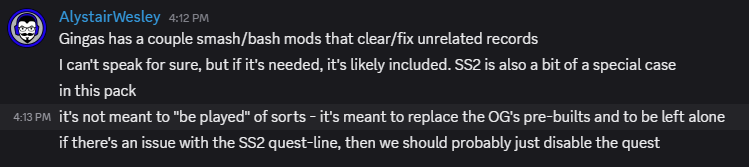
Also according to one of the mods on its Discord server, SS2's story is not meant to be played with this list.
What about Vortex lists?
Vortex current doesn't recognize ESL-flagged plugins for FO4 VR. My past experiences with Vortex have also not been great, so I prefer MO2. I highly recommend using MO2.
Pre-Requisites
Upgrade MO2 to at least 2.5.3b3
The latest stable version of MO2, 2.5.2, does not properly recognize ESL-flagged plugins. Many SS2 addon packs are ESLs or ESL-flagged ESPs, especially city plans. MO2 2.5.3b3 supports ESL with Daytripper 4 installed.
To upgrade MO2, you'll need to download the latest version from the MO2 Discord server in the #dev-builds channel. At the time of writing this, 2.5.3b5 is the newest version.
Download the Archive link and extract it in to the folder you installed your mod list too, letting it overwrite the MO2 files.
Configure Daytripper 4
Full ESL support isn't enabled by default in Daytripper 4. By default it can load ESL files, but does not load them in the ESL form id space, which is what allows the game to load ESL files outside of the default plugin limit.
To fix this:
- Close MO2 if it is open.
- Open the Daytripper 4 folder, which can be found at
(mod list install folder)\mods\Daytripper 4\F4SE\Plugins. - Open Daytripper4.toml in notepad or another text editor.
- Find the
SmallFileLoadersetting and changefalsetotrue. - Save the file and reopen MO2.
MO2 should now allow you to enable ESL files in the Plugins pane.
If you are doing this in the middle of playthrough that you intend to continue, this is a one-way trip. Once you save the game with SmallFileLoader enabled, it cannot be reverted back. If you change SmallFileLoader back to false, saves made with it enabled will then be broken or not load at all.
Enable Creation Club Update for Fallout 4 VR -LITE-
This is an optional file found on the Daytripper 4 downloads page. It's included in the mod lists mentioned above, but might be disabled by default. Enable it, even if you aren't using any Creation Club content. SS2 uses some records that were added to Fallout4.esm for CC content, but those records are missing from FO4 VR's Fallout4.esm since FO4 VR is based on an older build of flat FO4. This mod adds the missing records.
It fixes these two issues in SS2:
- HQ Command mode doesn't work properly when Command Mode Uses Task List is enabled.
- Looting the Stheno during the quest Outside Assistance causes the game to crash.
It also fixes issues in other mods that make use of the newer records, such as Trunk's Malfunction.
Update Workshop Framework & Sim Settlements 2
- Go to the Workshop Framework downloads page and download the latest version. Install it in MO2 and let it replace the existing version.
- Open the Workshop Framework folder and remove the F4SE folder. This is because the plugin is made for flat F4SE and not the VR version. If you try to load it, you'll get a popup saying it's not compatible.
- Go to the SS2 Chapter 3 downloads page and download the All Chapters Pack file and the SS2 Extended file. Install both in MO2 and let them replace the existing versions.
The Old Gen Replacers download for Workshop Framework can be skipped, as it only affects the F4SE plugins included in WSFW, which don't work in VR anyway. I have verified this with kinggath (creator of SS2).
Recommended Essentials
These are mods that help improve SS2's usability in VR. Some might already be included in some lists. I'm listing them because they aren't in all three lists already.
Canary Save File Monitor
A simple tiny mod that alerts you when script data has been corrupted in your save. This is especially important for SS2 and other script-heavy mods that have added support for it.
Additional Official Patches for SS2
On the SS2 download page, you can find three optional files:
- SS2 DLC Settlers Patch
Improves SS2's compatibility with Far Harbor and Nuka-World settlers. - SS2 Extended Outfit Injection ESL
Adds many of SS2's custom outfits to the random NPCs in the world. - SKIP SS2 Workshop HUD Override
This does not work in VR. However, there is a VR version available in my VR Clipboard mod below.
Fallout 4 VR Compatibility Patch for Sim Settlements 2
This mod fixes several SS2 issues specific to VR.
Skip the optional Book Fix file as Daytripper 4 already includes a better fix. If the mod list you're using has VRCP's book fix, disable it.
SS2 VR Clipboard and Fixes
SS2 uses HUDFramework to display a lot of important information in settlements and HQ. But HUDFramework doesn't work in VR, so I created this craftable Clipboard item that will display that information in popups.
While VRCP for SS2 does this a little by adding some extra info at a city planner's desk, I wanted something more portable and made this as a chem that can be added to your favorites wheel. It also displays more info, such as HQ stats when in HQ, and battle reports after Ch3's battles.
There is also a VR version of SS2's optional Workshop HUD Override patch available in the Optional file section.
Sim Settlements 2 Settlement Management Terminal
This adds a buildable terminal that provides some extra utility. Make sure you shoot one with the Vitomatic to upgrade it so that it can track settler stats. I use this a lot to find settlers in my settlers with high stats so that I can assign them to the plots that will benefit them the most.
Some Things to Be Aware Of...
Be Aware of Plugin Limits
You can check the number of ESP and ESL plugins in MO2 by hovering your mouse over the number in the top-right corner of the Plugins pane. If ESMs+ESPs is over 255, you've gone over the limit and the game will not load. ESLs can go up to at least 2048 plugins supposedly, possibly 4096.
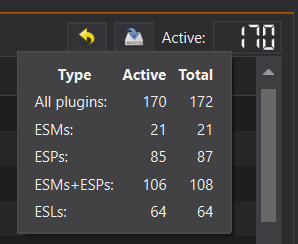
If you are using the F4FEVR list, which has the lowest number of included mods out of the three lists, then you have plenty of room to add nearly as much as you want.
If you are using Mad God's Overhaul or Ginga's Essentials Overhaul, you might not have as much room to work with due to ESP limits. ESL'd files won't have issues, but not all addon packs have ESL versions. Enabling SmallFileLoader in the previous Daytripper instructions will free up lots of ESP slots.
Also Be Aware of BA2 Limits
There is a limit to the number of BA2 (archive) files that the game can load. Information on the exact number is inconsistent. Usually you'll know if you've hit the limit if the game crashes on the main menu. You can extract BA2 files to loose files in their mod folder and then remove the BA2s to help get around this limit. This is generally safe to do with SS2 addon packs.
Recommended Addon Packs
Browse the SS2 Catalog
I had a larger list here, but decided instead to just point to my website that lists nearly all available SS2 content. You can find just about anything there using the search and filter functions.
SS2 comes with only about 200 building plans and 36 city plans, but there is so much available from the community.
You can also check the SS2 category on Nexus for more SS2-related mods that aren't technically addon packs, as SS2 Catalog doesn't cover every single type of content. Just be aware that any that require F4SE or HUDFramework probably won't work in VR.
SS2 Mod Conflicts in VR
These are either VR related or SS2 related mods that might cause issues.
Workshop Plus
Workshop Plus is another workshop mod from kinggath that adds several quality of life features to the game, and to me is essential in a flat FO4 playthrough, however I have found two major issues with it in VR and recommend not using it.
- With WS+ installed, settlers cannot be manually assigned to plot. According to mith077, creator of VRCP-SS2, this is because anything that adds alternate activation to the workshop objects will prevent anyone from being assigned to them.
- Fly mode breaks Virtual Holsters when leaving workshop mode. I also had a few crashes after doing this. You can disable fly mode in WS+ settings.
SS2 Customizable Faction Identity
SS2 VR Clipboard and Fixes now includes a fix for this issue.
This is one of the optional files found on the Chapter 3 download page. Normally, this allows you to build a Faction Leader's Desk which then allows you to create a custom flag for your SS2 faction. However, it does this by taking all of your weapons away when you use the desk so that you only have the flag to customize, and then it's supposed to return your weapons when you finish.
However, in VR it is not returning your weapons. You can sit down at a random chair, or other seated furniture, and get up to make it give you back your weapons, but it might not remove the flag from your inventory. It also will not re-add your weapons to your holsters if you are using Virtual Holsters.
Heisenberg - Physical Interactions
This is a recent VR mod that's gaining popularity, but is still in an early, work-in-progress state. One of its features is that newly acquired items get placed in the player's hand or dropped nearby so the player has to pick them up and place them in their backpack with an over-the-shoulder gesture.
The issue is that his also applies to the barter menu, which SS2 uses as a selection menu rather than a normal vendor menu, most notably for selecting building plans for a plot. A few users have reported that Heisenberg will cause their selected building plans to appear in their hands.
I've also seen a similar issue reported when using my SS2 Clipboard mod or the SS2 Town Meeting Gavel, as they are technically aid items and Heisenberg is trying to treat them as consumables.
SS2 Quest Issues
SS2 isn't perfect, even in flat FO4, and can have issues. I recommend making frequent manual saves, especially when starting SS2 quests or getting ready to do major objectives in them. I also recommend that you don't cancel any dialog in progress, as sometimes doing so will soft lock a quest.
I'm still mid-playthrough at the time of writing this and will be updating it as I find issues and workarounds.
These are quests that I've had issues with so far. Some of them might not be VR specific. I'm trying to get through as much of SS2 as I can without resorting to skipping quests or using the dev console. I had to do that quite a lot in my previous play-though and was too frustrated to finish Chapter 3 as a result. So if you run in to issues and these fixes don't work, you may have to skip quests using the City Manager Holotape or skip stages using the dev console.
Chapter 1
Hub of the Problem
Save before entering the basement via the hidden trap door. There's a holotape in it that needs to be activated at one point to progress the quest. However, some players have reported that the tape simply isn't there. In my case, when I reached for the tape, it fell through the bottom of the safe it's sitting in and I couldn't reach it anymore.
Vim and Vigor
Save before collecting the Vitomatic. In flat FO4, collecting it plays a brief animation in which your character drops it on the floor. In VR the game will freeze your character for a bit while it attempts to run the animation. In most cases the freeze lasts as long as the animation normally would. The first two times I did this, it never seemed to unfreeze my character. On the third attempt it eventually let me go, but I don't know what was different.
Where There's Smoke
As noted on the SS2 wiki, this quest has a lot of issues. Make a backup save before reaching the north-east quest marker when you go to search for the source of the radio signal.
There's a bit of jank where the quest will teleport you and freeze you in place for a scene when you approach the north-east marker. Try not have a gun equipped when this happens. On one attempt it never unfroze me and I was stuck. The only difference is that during that attempt I had my gun out.
The second issue happens at the end of the battle. During the battle kill the hostiles, but try to leave a few for Jake, Aiden, and your companions to finish off. Try not to have a weapon equipped when the last hostile is killed. You'll know it's over when the battle music finishes. At this time go talk to Aiden. If a new scene/dialog doesn't start, you will have to reload and try again. This took me four tries to get it to work. By then I had a sense of how long the fight would take and spent the last half of it hiding in one of the nearby huts and waiting for the others to finish off the hostiles.
Picking Up the Pieces
Save before returning to the hardware store after dropping the 3rd beacon. I had consistent crashes every time I entered the room. The Buffout crash log points to an audio corruption issue. I suspect that there might be an issue with the audio file that Aiden is meant to use when he starts talking to you. There are many threads about this on the SS2 forums, but no set solution.
What worked for me was disabling MemoryManager in Buffout4.toml. You can set it false, progress the quest a bit, and then set back to true and continue.
Chapter 2
Commonwealth Rising
After completing the Comm Array upgrade near the end of this quest, the quest did not update with a new objective to tell me what to do next. However, I was able to just return to HQ and find the department heads in the Comm Array room to start the next scene. The quest completed after that.
Chapter 3
Flickerin' Lights
Saving Neil during this quest is optional and difficult. Do not at any point cancel the dialog with him or he will get stuck where ever he is standing and the quest will not progress, even if you don't care if he lives or dies.
When he asks if he should do extra stuff, such as looting a nearby bag, tell him to stay put. Some of these other options don't seem to work properly. Supposedly the Interior Navcut Fix mod mentioned on the quest's wiki page fixes this issues, but that mod is not compatible with FO4 VR. Buffout 4 NG also includes its own navcut fix, but I had it enabled and still had this issue.
Before moving from A3 to B1, he will freak out a little. You must use the speech check option and pass it to continue. Every other option will get him killed. Maybe one of them works if you let him grab some loot previously, but when I let him do that, he got stuck. I think that's where the Interior Navcut Fix mod is required for it to work normally. The other times you need to tell him to stay put don't require speech checks.
Check the images on the wiki page to know which buttons are for which lights. They're fairly easy to remember, at least to me. Lead him around the lights in this order:
- Main (starting point) -> A1-> A3 -> B1 -> B2 -> D2 -> Main (stairs)
When he gets to the door after the final Main light, tell him to use the right button. In my playthrough with XDI, this was listed as something like "Nuh-uh".
Resurgence
Check the wiki page above for info on issues with this quest. I chose Spectacle Island, which I hadn't unlocked yet. I went and took control over it, then let Lupe build a city plan.
Where things get a little weird, but still functional, is the vertibird battle at the end of the quest. Your character likely won't stay in the proper place during the flight. I was constantly clipping through the vertibird and sometimes was floating several feet outside of it. If you get motion sick easily, you might want to use the City Manager holotape to skip this quest. But on the plus side, you can aim and shoot in any direction in VR, unlike in flat FO4 where the mounted minigun has limited range of motion.
Also, don't start shooting the enemy vertibird until it gets marked as an objective. I think if you damage it too much before that point, the quest breaks a little. I destroyed it very quickly on my first attempt, but then got stuck circling GNN without the quest progressing. On the second attempt I waited until it was marked and then took it down.
After the minigun battle, there are some "cutscenes" that are very janky in VR, including some full black or white screens, but as long as you are patient and wait through the sequences, you'll eventually get control again after a conversation with Jake. Try not to force your way through them by opening menus or canceling dialog.
Me and This Army
There are a couple of issues with the binoculars in VR.
First is that if you are using an upscaler mod, using the scope might cause the game to crash. This is because upscalers are not compatible with vanilla scopes. Some mod lists fix this by including something like the See Through Scopes mod to add new scopes that don't have this problem. However See Through Scopes doesn't include a scope for binoculars.
You can try to fix this using the Fallout 4 VR Upscaler Scope Fix mod. I do not know how well this works as I am playing without an upscaler.
Another workaround is to just be careful not to use the scope. You can still point the binoculars at something and hip-fire. This works for marking locations, but might not work for marking enemies.
The second issue I had with the binoculars was marking enemies for the quest objective. I had to go right up to the gunners, enabled VATS (I use a VATS bullet time mod), scope, look at a gunner, and hope that it decides to mark them. I was standing inches away from each one that it marked, but it wasn't consistent and took several minutes of running between different gunners trying to make it work.
One other issue, not related to the binoculars this time, happened when Sal asked me to follow him after the battle, I didn't follow and ran around to loot some bodies instead. This seemed to break him and made him run back and forth between the draw bridge and depot. I had to reload my save and follow him immediately for it to work properly.
Flare Gun Issues
Sometimes the flare gun fails to start an assault and you will get a notification saying "No Minutemen are able to respond." When this happens use the binoculars to target a clear spot on the ground that NPCs can navigate to. SS2 seems to do some sort of check to see if the marked spot can be navigated to. So if you target the top of a tree, or something like that, the flare gun will fail. I think this also applies to where you stand if you try to use the flare gun without a binoculars target, as it tries to use your current position when no target is marked.
Permanent Following Soldiers Bug
Another issue I ran in to while doing the war mechanics, was that at some point I had gained a group of soldiers that wouldn't stop following me. I suspect this might have been caused by starting an assault on a territory while the scripts hadn't finished processing the last assault that I did.
While it was nice to have a squad follow me and annihilate my enemies while I ran around the Commonwealth, they got in the way when I went indoors, and sometimes shoved me around when I was trying to talk to quest NPCs.
I tried changing their role, changing their home settlement/outpost, moving them to HQ, etc, but none of that got rid of them. What finally worked was moving them all to a small outpost and making sure they were assigned as warriors. I then assaulted a territory nearby so that the game would include them in the assault team. Once the battle finished, the game finally sent them home.
State of War
This will be fixed in SS2's 3.6.0 update.
I got stuck on the "Clear the remaining Gunner outposts" objective. I went looking in to the quest's script and found the cause of it. This happens if you clear the outposts without calling a proper assault. I just went to each settlement with only my companions and killed the Gunners myself.
There's a check that runs to see if you cleared the outposts. It's supposed to run on a timer, but that's bugged. I identified the cause and reported it to kinggath's issue tracker, so hopefully it will get fixed. It's also supposed to run every time you complete an assault on one of the outposts. The way I took them without assaults would have worked if the timer wasn't bugged.
So to avoid this bug for now, assault outposts with your soldiers, instead of attacking them solo. You mainly need to take the final one using an assault, so that the check runs and sees that you've cleared them all.
If you're already past this point, you can use this console command to force the check to run: cqf SS2C3_MQ32 CheckForClearedGunnerOutposts. This won't skip any dialog or the quest.
In theory, you could also let the Gunners take one of your outposts or settlements so that they turn it in to an outpost, which you could then assault. I haven't tested this idea though.
Side Quests
Father I Have Sinned
This quest is already notorious for being buggy in normal FO4. Make frequent manual saves for this one.
First off, it's very common for Father Edmund's dialog to not start when you try to talk to him in the early part of the quest. This is a know bug and a fix has already been logged in SS2's private issue tracker, but I don't know when or if the fix will be added to a SS2 patch. It might also be causing another issue which I will describe in a later paragraph.
If you'd like to patch this first bug for yourself, open SS2_XPAC_Chapter2.esm with xEdit.
- Navigate to FormID xx00557C, where xx is the plugin ID for SS2_XPAC_Chapter2.esm. Or go to Quests > SS2_ConcordQuest_Joy_FatherIHaveSinned > SS2C2_Joy_FIHS_02_FirstScene.
- Right click this Scene form and select Copy as override into...
- Select <new file>.esp with the ESL flag.
- Enter whatever you want the filename to be for the patch.
- Navigate to that form again under your new plugin file.
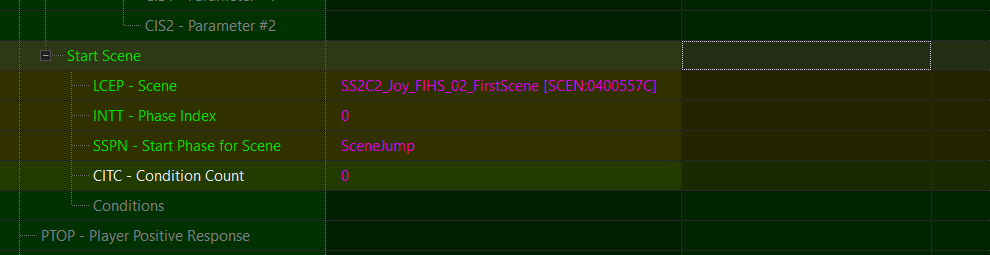
- Scroll down on the right side to find Actions > Action (the last one) > Start Scenes > Start Scene (the second one whose Start Phase says ScreenJump)
- Right click the empty cell to the right of Start Scene under your new plugin's column (should be on the right side) and select Remove.
- Save the plugin from the main menu or Ctrl+S.
- Exit xEdit.
- If you're using MO2, the new plugin will be in your overwrite directory. You can leave it there or move it to a new mod folder. Make sure you enable it in the plugins pane.
But then I ran in to a second bug. After you return to Edmund later, the quest will direct you to talk to Abigail. When I did this, I failed the speech check and was told by the quest to go back to the campsite to look for clues. When I found the clues and returned to her, she only gave me the same dialog from the first time I talked to her. I tried waiting a day, doing things in a different order, etc. But nothing worked. The only thing I was able to do was to reload right before the first dialog with her and keep trying the speech check until it passed. Not a fun thing to do with only 1 charisma...
This is where I'm not entirely sure that fixing Edmund's dialog may or may not have broken Abigail's dialog. I would think not since the fix only touches the "first scene" but I don't know enough about quest scenes to be confident about that.
Unique Settler: You're Pretty Good...
I had an issue with this quest that seems to be a bug with either VR or one of the VR-specific mods, such as FRIK maybe, where the forced brawl would start, but I was unable to damage Sneake. My fists would just pass through him as though they weren't "equipped" despite that they were visibly closed. This also happens during the brawl in the Dugout Inn for the vanilla quest Confidence Man, which is why I think its a VR issue and not specific to the Sneake fight.
I found a work around by using the favorites wheel to equip a gun and then unequip it. Then my fists were open again and I was able to press RT to close them and have them equipped properly. I was then able to punch Sneake normally. I also did this in VATS (using the Bullet Time VATS mod) so that I had time to fiddle with the controls while he was trying to attack me.
CPD: Critical Perpetrator Detention & Camp Patrol Duties
There's a known issue when transitioning from one quest to the next where the Forseti you're meant to meet with won't arrive at the Hellhound camp at the start of Camp Patrol Duties. This happens if you fast travel during that step of the quest. The cop will get lost somewhere between the location of the previous quest and Hellhound camp. You can either load an earlier save and walk with them to the camp or go look for them in between the two locations. If you go looking for them, they will speak as though they are already at the camp and won't follow you, but you can continue on to the camp by yourself to continue the quest.
NLTC: Black King, White Knight
This will be fixed in SS2's 3.6.0 update.
This is another issue that is not VR specific. During this quest, Allison will ask you to take a detour to a raider camp. Save before killing the targeted raider. Upon killing the raider, she'll ask you to loot the corpse for an Unsigned Invoice. However, if you loot it before she asks, you won't be able to complete the objective. The item is marked as a quest item, so you cannot put it back on the body to re-loot it. This is an optional objective, so if this happens you can either ignore it and continue with the main objective or reload a save and try again.
NLTC: Leverage
This will be fixed in SS2's 3.6.0 update.
During this quest, the involved characters may initiate dialog with you in the middle of combat, which temporarily disables weapons in VR. Do not cancel or exit the dialog early as doing so may break the quest sequence.
There is also a known issue regarding the bank's master key. It's not required to complete the quest, but it is a bug none the less. One of the ghouls in the archive wing of the bank is meant to drop the master key so that you can loot the vault after the quest is complete. However, the bug is preventing the key from being added to the ghoul. You can either ignore it or unlock the vault door with the unlock command in the dev console.